Investment Portfolio Tracker Your Whole Portfolio in One Place
No matter how many accounts it is spread across, log every holding and see what it all adds up to. Gain or loss on each one, a trend chart of your total value and your allocation by category, without a spreadsheet or five brokerage apps.
- One time purchase
- No account or login
- No ads
- Phone, tablet and computer
What's inside
Your holdings, your trend and your mix, all in one app.
All your investments, in one place.
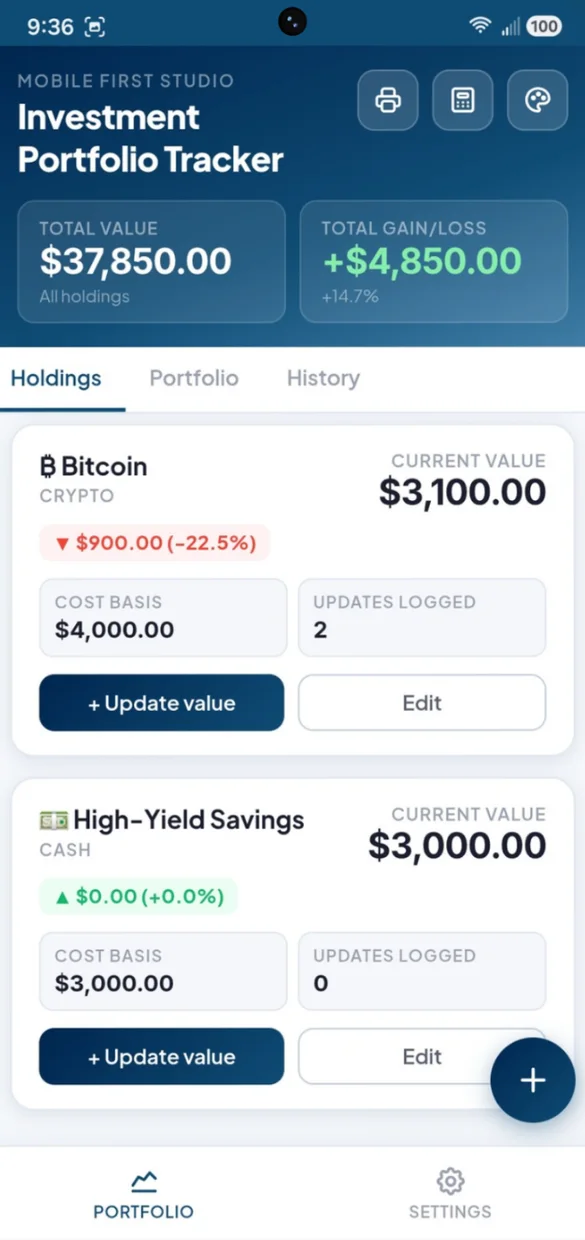
Add each holding with a name, a category, your cost basis and its current value, no matter which account it sits in.
- 8 categories: stocks, ETFs, mutual funds, bonds, crypto, real estate, cash and other
- Gain or loss: on every holding, in dollars and percent
- Updates logged: how many times you have updated each one
A trend chart built from your own numbers.
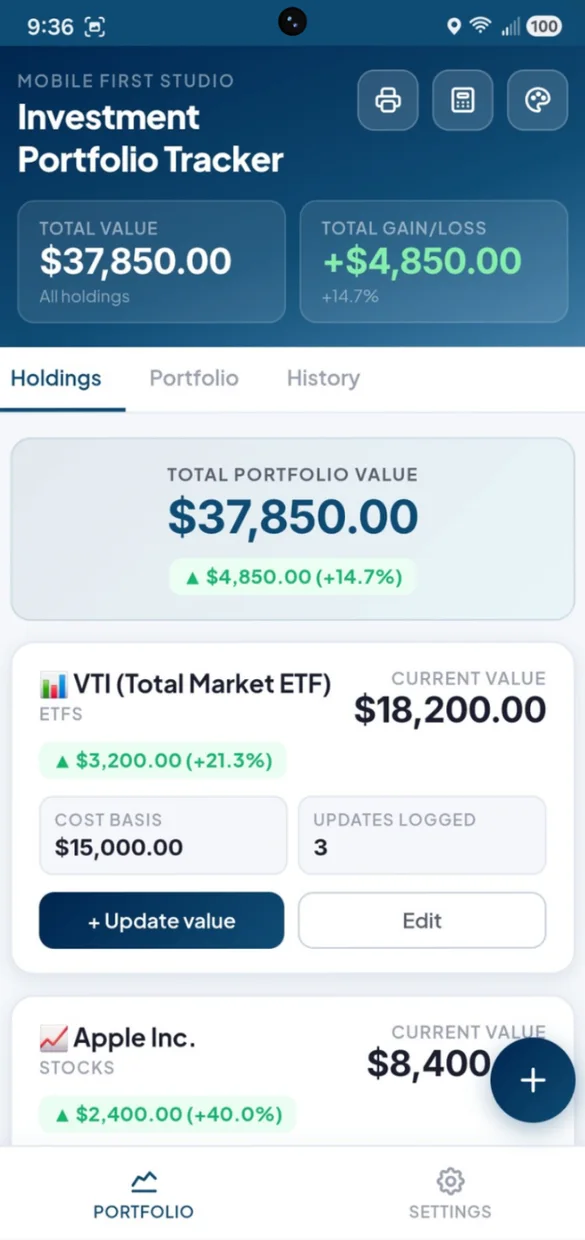
Update a holding's value and a line chart of your total portfolio builds itself over time.
- Snapshots: every update records your total value
- Two days: of history and the chart draws itself
- Notes: like "quarterly check-in" on any update
Know exactly where your money sits.
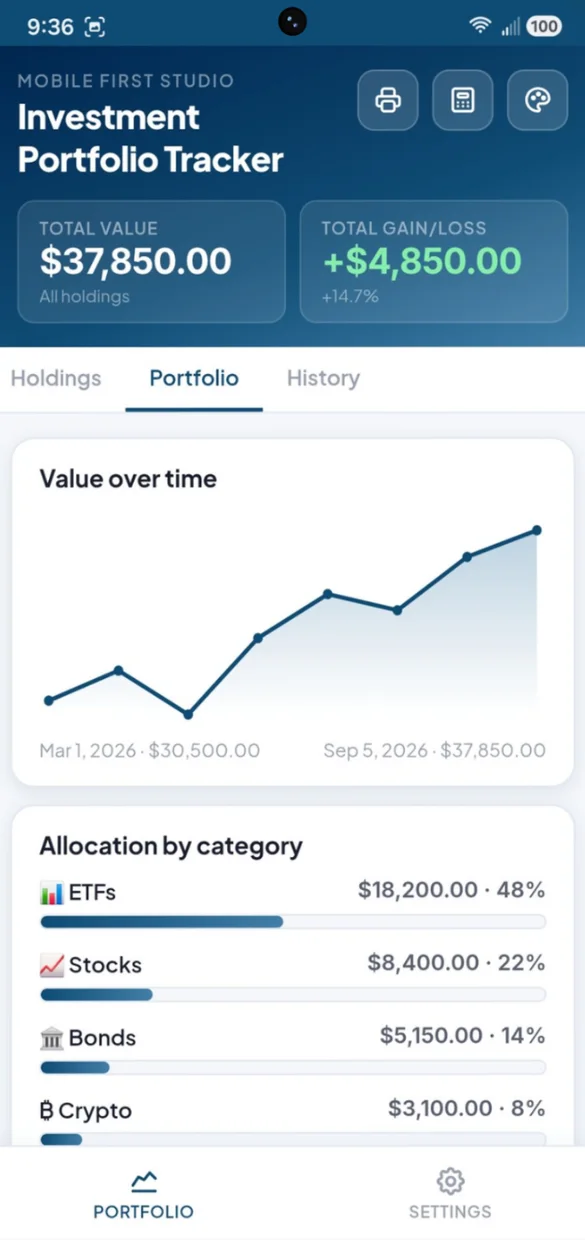
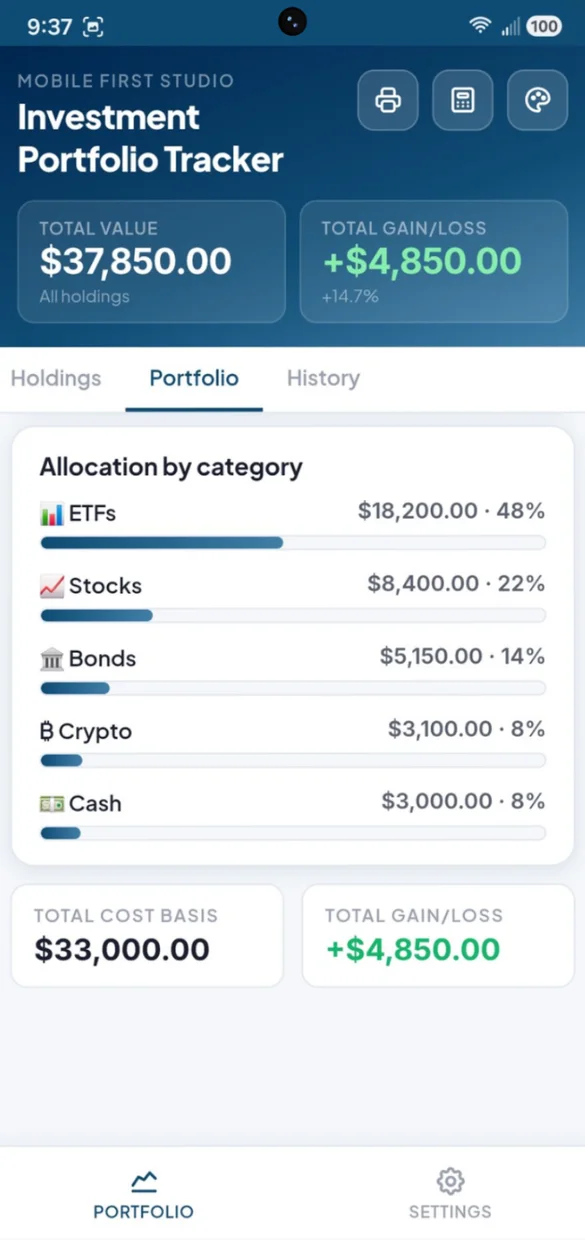
See what percentage of your portfolio is in each category, so you can spot when one area has grown too large.
- Bars: for each category, with its value and percent
- Total cost basis: what you have put in
- Total gain or loss: across everything you own
On paper or in a spreadsheet.
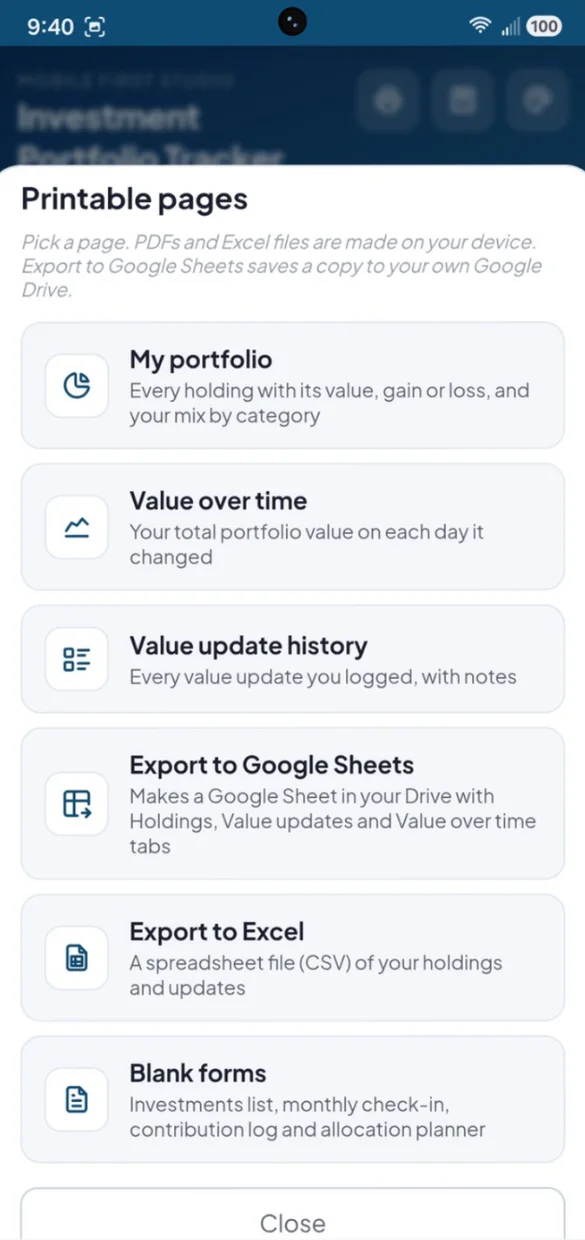
Print your portfolio, your value over time or your update history. PDFs and spreadsheet files are made right on your device.
- My portfolio: every holding's value, gain or loss and your mix
- Blank forms: investments list, monthly check-in, contribution log and allocation planner
- Excel and Google Sheets: a CSV file, or a Sheet in your own Drive
Little extras that help
Totals up top
Your total value and total gain or loss stay at the top of every screen.
Allocation planner
A printable page to compare your target mix to what you really have.
Manual by design
No brokerage links and no bank logins. You control every number.
Built-in calculator
Work out a cost basis or a percent change without leaving the app.
Light or dark
Switch modes and pick from 6 color themes.
Works offline
Nothing needs a live feed, so it works fully offline.
Your portfolio stays yours.
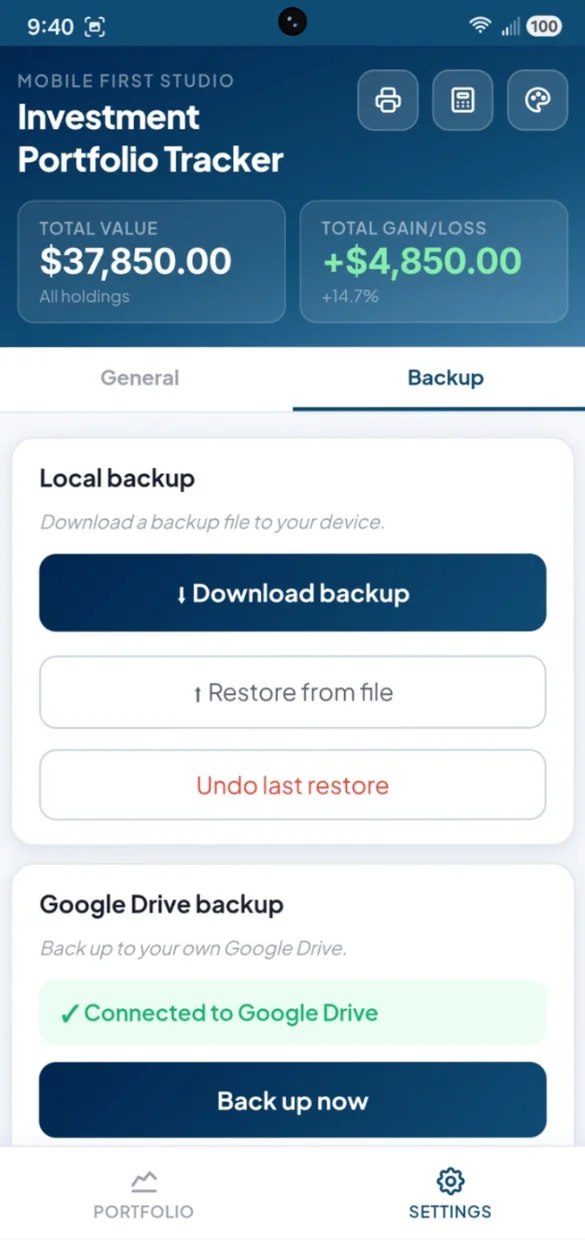
Everything saves privately on your device and works offline, with no account or login. Connect your own Google Drive for a live copy plus a week of daily snapshots, or download a backup file and keep it yourself. One tap undoes a restore.
- One time purchase, yours forever
- Saved privately on your device, offline
- Optional Google Drive backup, in your own account
- A week of daily Drive snapshots
- Backup file you can download anytime
- Undo a restore with one tap
- No account or login, ever
- No ads, ever
How it works
Buy on Etsy
Download your app PDF and your bonus printable forms.
Tap the link
Open it on your phone, tablet or computer.
Add it to your home screen
Or bookmark it, then add your first holding. Install guide
Good to know: this is a web app, so there is nothing to download from an app store and updates arrive on their own. Every number is entered by hand, with no brokerage or bank connection, so it works fully offline.
This app is for your own records and is not investment or tax advice.
The free demo is a separate trial, so anything you enter there stays in the demo.
Questions
Is there a subscription?
No. You pay once on Etsy and the app is yours. No monthly fees and no ads.
Does it connect to my brokerage?
No. It is a manual entry app on purpose, with no brokerage accounts to link and no bank logins. You enter every number yourself, so nothing needs a live connection.
What can I track?
Any holding you own, in 8 categories: Stocks, ETFs, Mutual Funds, Bonds, Crypto, Real Estate, Cash and Other. Add a name, a category, your cost basis and the current value for each.
How does the trend chart work?
Each time you update a holding's value, the app saves a snapshot of your total portfolio value. Once you have at least two days of history, the chart draws itself. You can add a note to any update, like "quarterly check-in".
How do I see my asset allocation?
The Portfolio tab shows what percentage of your money sits in each category, with a bar for each one, plus your total cost basis and total gain or loss.
Can I print my portfolio or open it in a spreadsheet?
Yes. Print your portfolio with every holding and your allocation, your value over time or your full update history. You can also export to Google Sheets in your own Drive, or download a spreadsheet file (CSV) for Excel.
Can I use it on my phone and my computer?
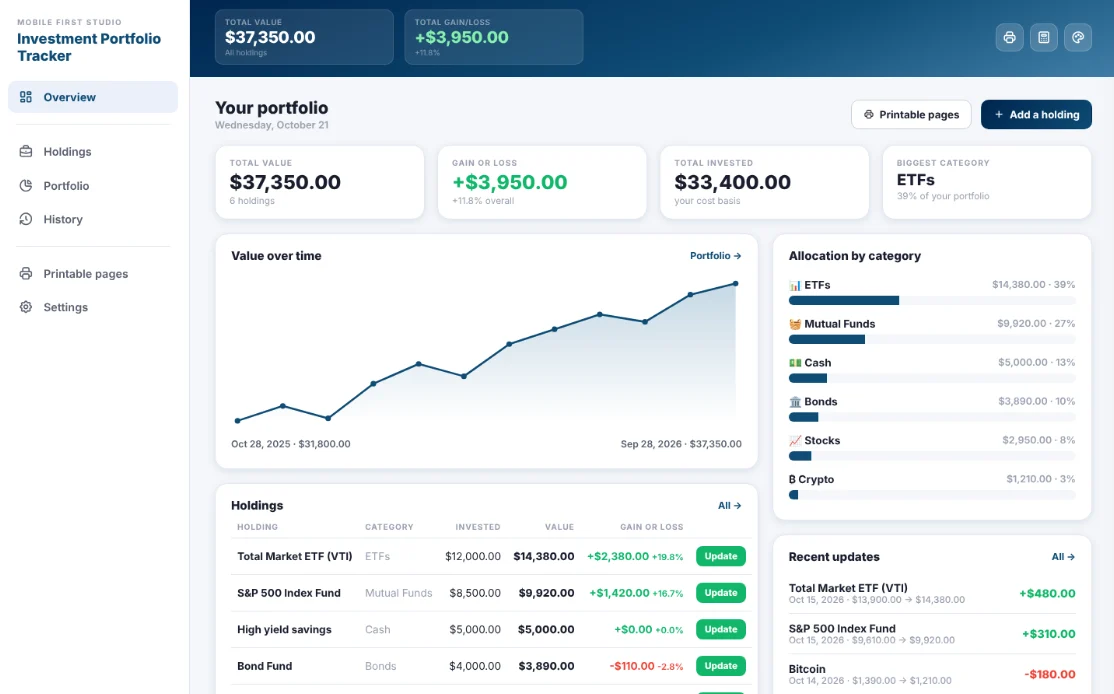
Yes. On a computer it opens as a full dashboard with your total value, gain or loss, a large trend chart, your allocation and a holdings table with an update button on every row. Back up on one and restore on the other.
What if it doesn't work on my phone?
Send a message through Etsy and I'll help you get it working. If it doesn't install or work on your phone, you can get a refund within 30 days.
Try it before you buy
The real app with sample data. Nothing you type is saved.