Ultimate Baby Tracker Feeding, Sleep and Diaper Log
Every feed, nap, diaper and first in one place, shared with everyone who helps. Live nursing and sleep timers, milestones, vaccines and growth percentiles, in English or Spanish, with no subscription.
- One time purchase
- No account or login
- No ads
- English or Spanish
What's inside
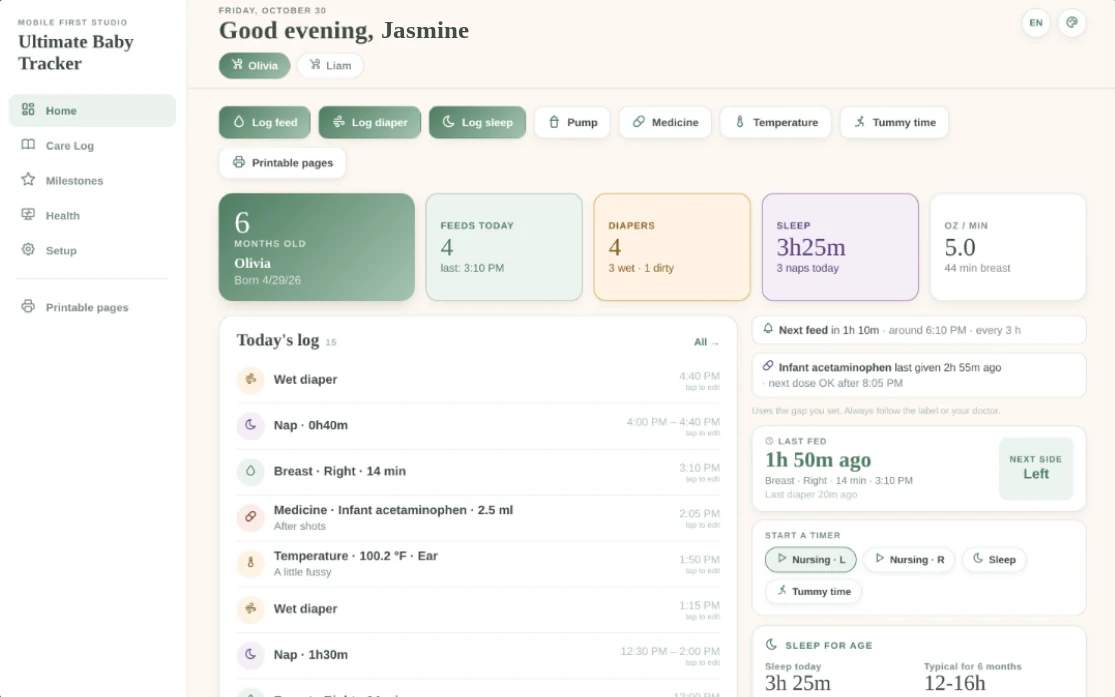
Feeds, sleep, diapers, health and every first, on your phone or your computer.
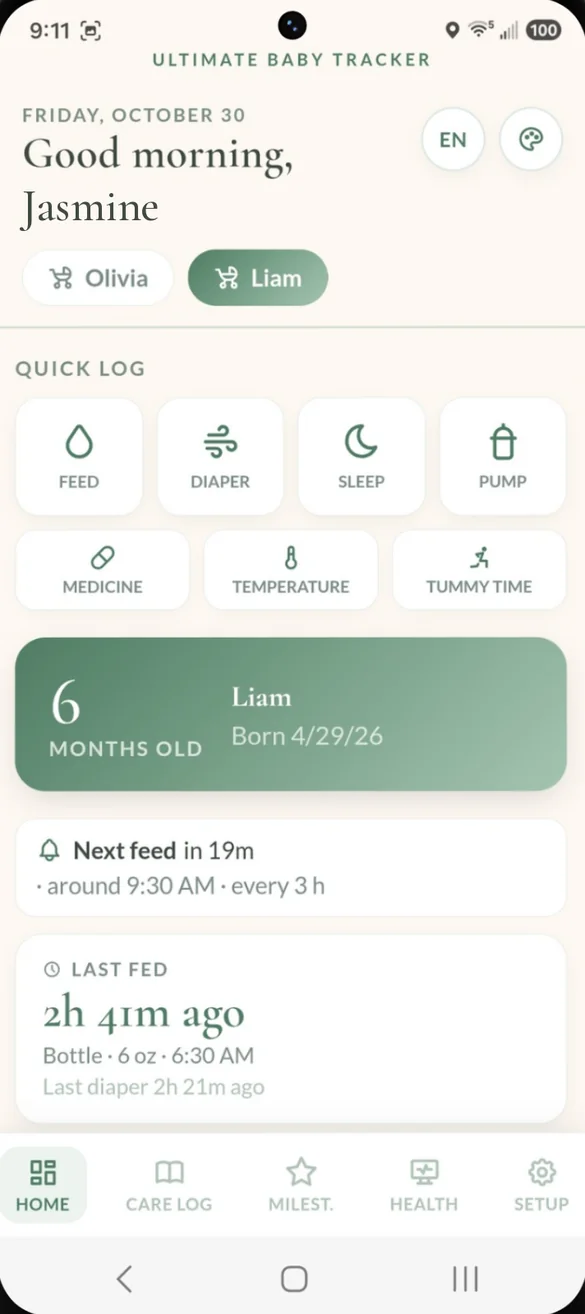
Your day at a glance.
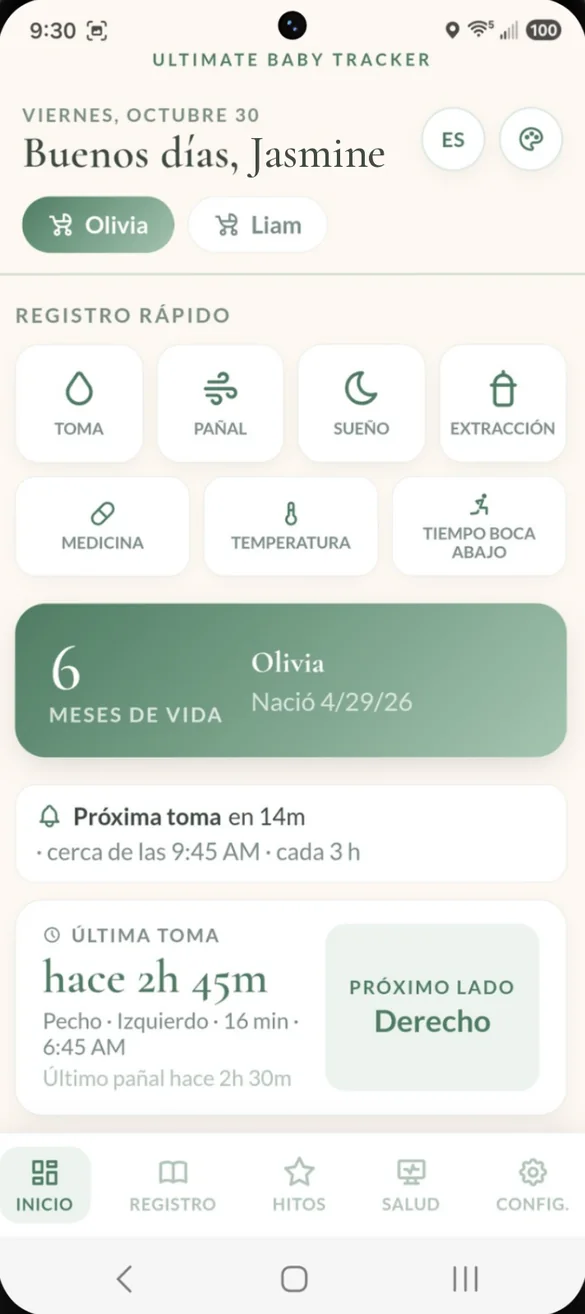
Home opens with one tap buttons to log what just happened. Below them you see when the next feed is due, how long ago the last feed was, which side is next and when the last diaper was, with your baby's name and age.
- Quick log: feed, diaper, sleep, pump, medicine, temperature or tummy time
- Next feed: when it is due, based on the gap you set
- Last fed and last diaper: how long ago, at a glance
- Live timers: nursing, sleep and tummy time, with a stop button when you are done
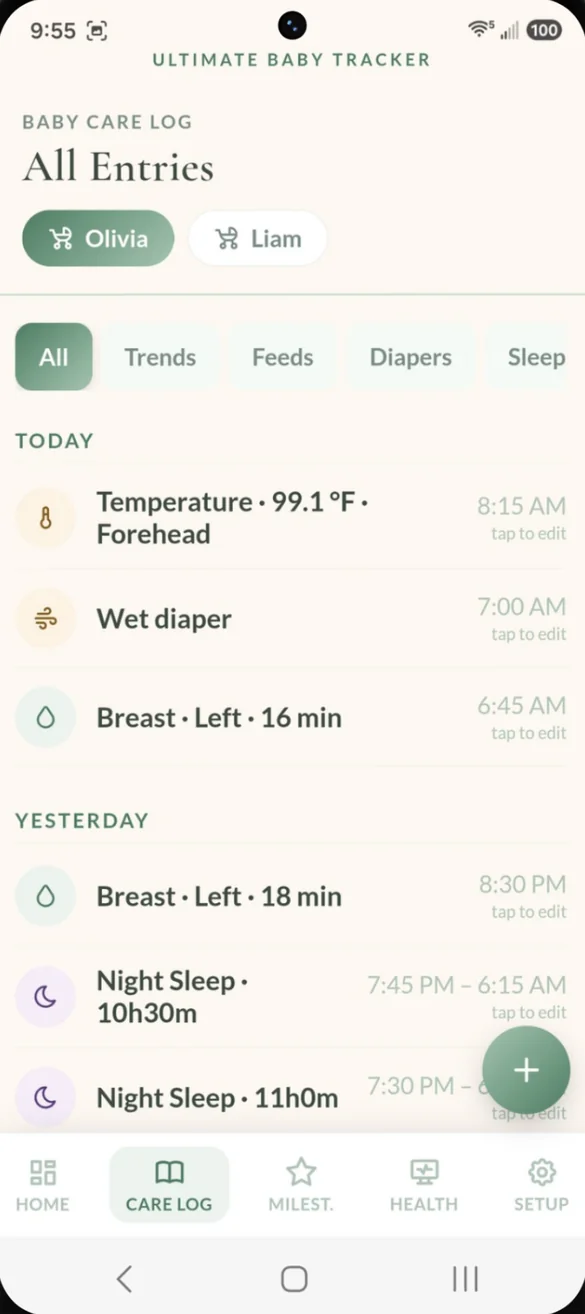
Every feed, every diaper, one log.
Feeds, diapers, naps, pumping, medicine and temperatures all land in one running log. The time fills in for you, so logging a bottle takes seconds. Tap any entry to fix it.
- Filter by type: all, feeds, diapers, sleep and more
- Timers save here: a finished nursing or sleep timer goes straight into the log
- Nursing timer: switch sides mid feed, pause, and see the minutes on each side
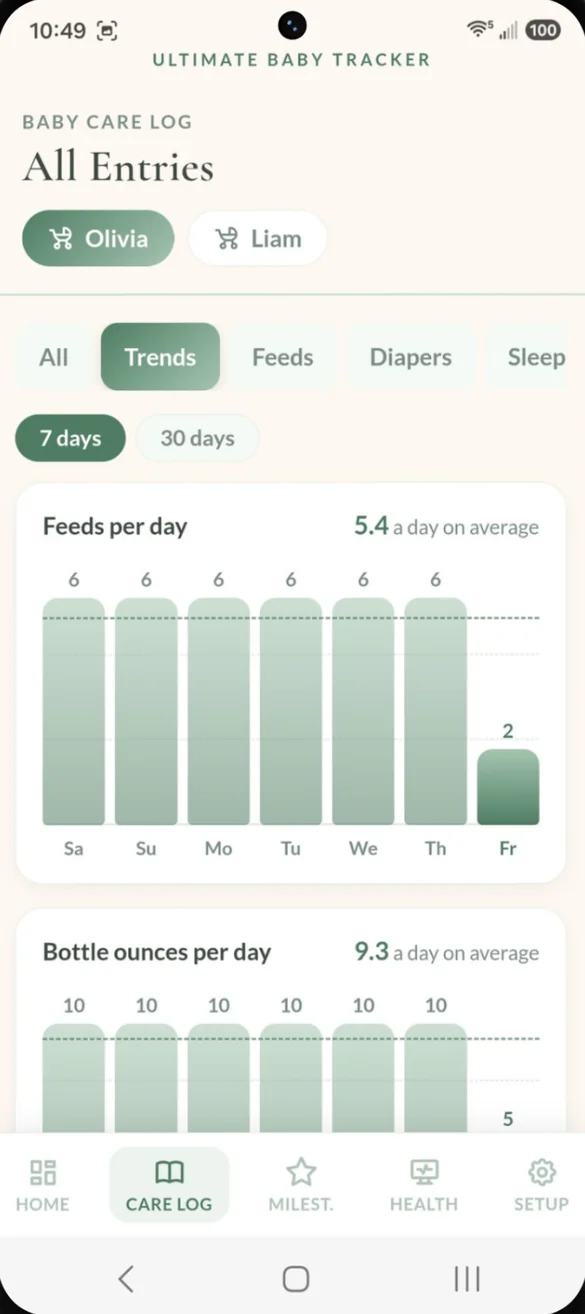
See the pattern, not just the day.
Bar charts for the last 7 or 30 days show how things are going, each with a daily average. Spot a change before your next checkup.
- Per day: feeds, bottle ounces, nursing minutes, sleep and diapers
- 7 or 30 days: switch with one tap
- Daily average: shown on every chart
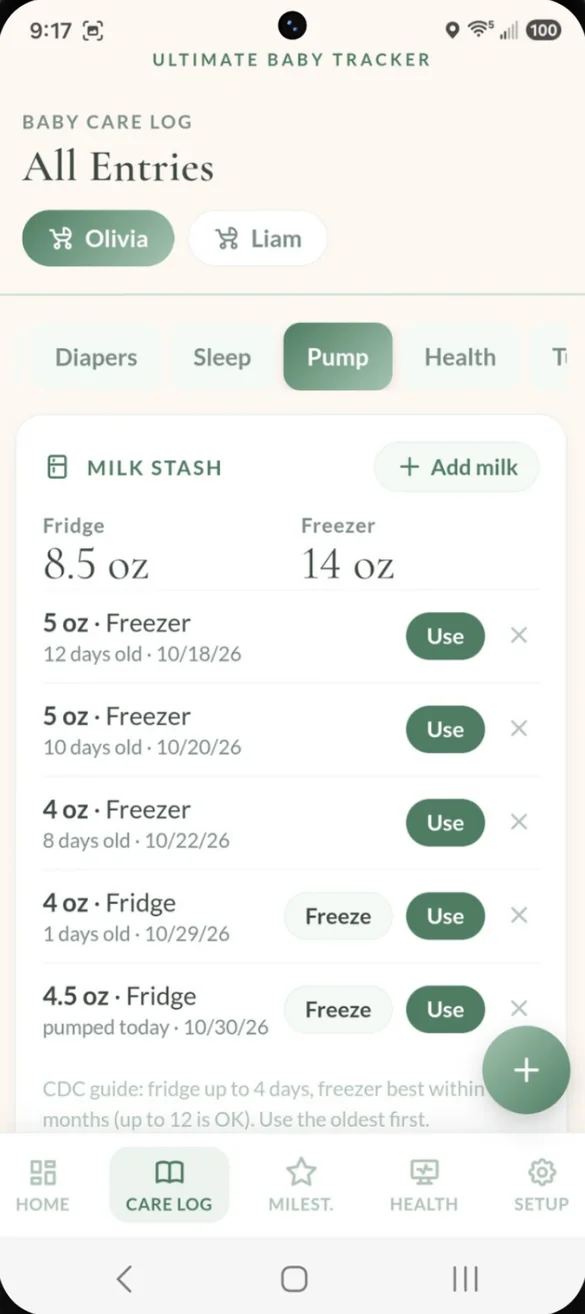
Every ounce, fridge or freezer.
Log each pumping session with the side, ounces and minutes. Then keep track of your milk stash and see how old each bag is, so you use the oldest first.
- Fridge and freezer totals: at a glance
- Bag age: days old and the date, for every bag
- Use or Freeze: one tap and the totals update
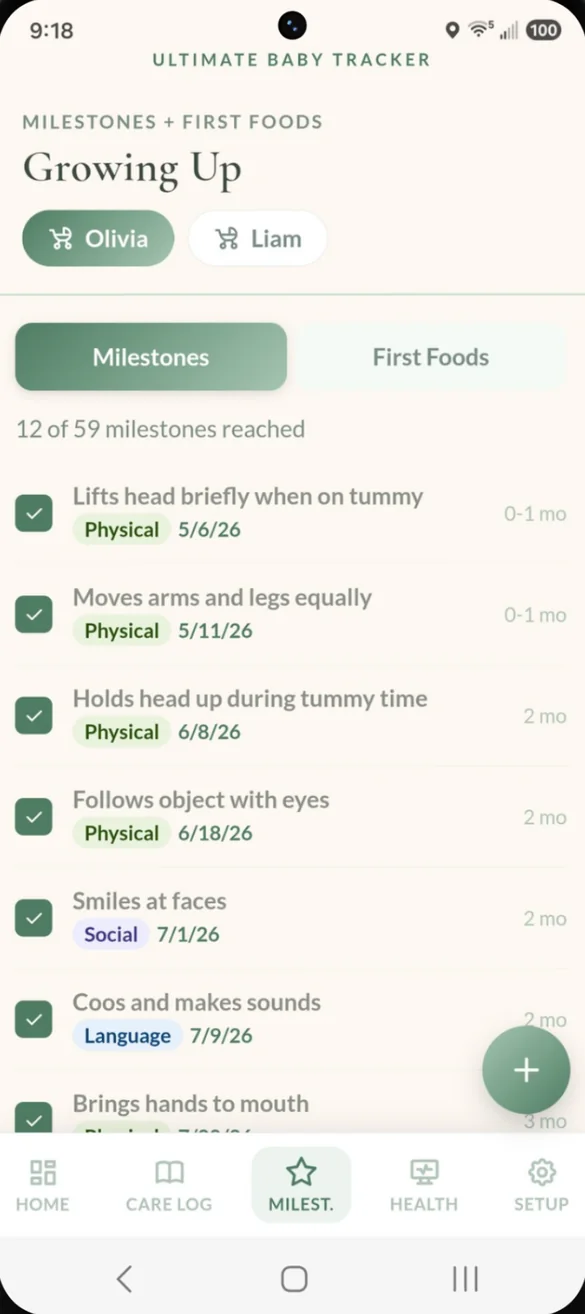
Every first, remembered.
59 milestones from newborn through toddlerhood, covering physical, social, language and cognitive development. Tap one the moment it happens and it's dated for you.
- 59 built in: with the typical age for each one
- Dated automatically: the moment you check it off
- Add your own: for the firsts that are just yours
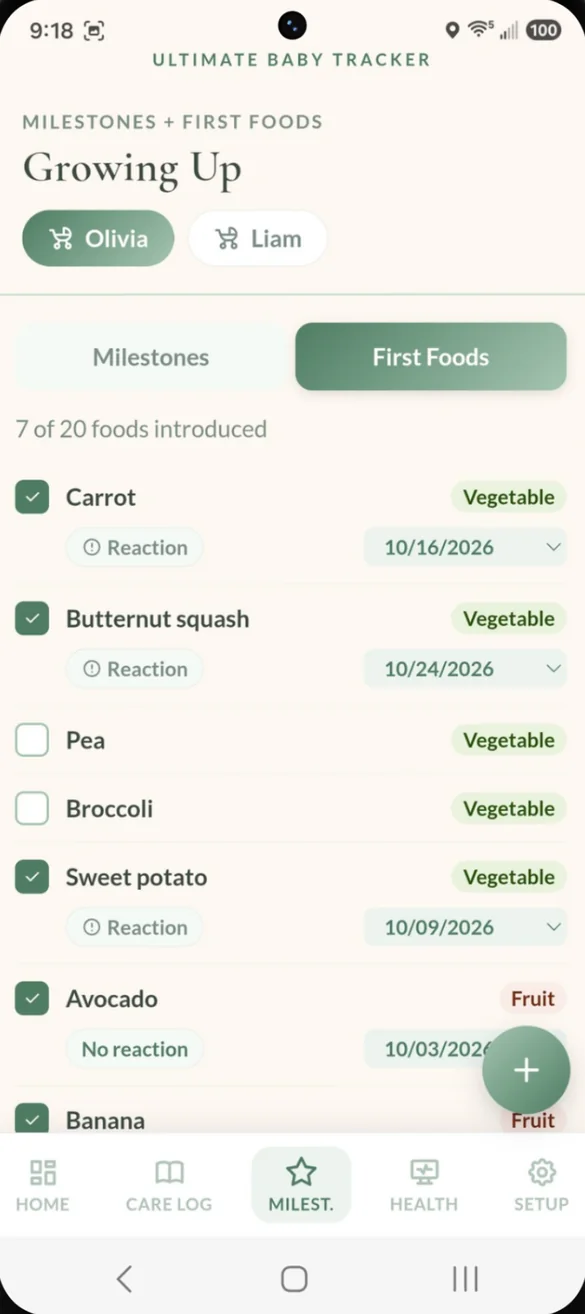
Every new food, with the date.
Start from 20 built in foods, then add your own. Each food is saved with its food group and the date your baby tried it, and common allergens have their own checklist.
- 20 foods to start: plus any you add
- Food group and date: saved for every food tried
- Reactions: note any reaction right on the food
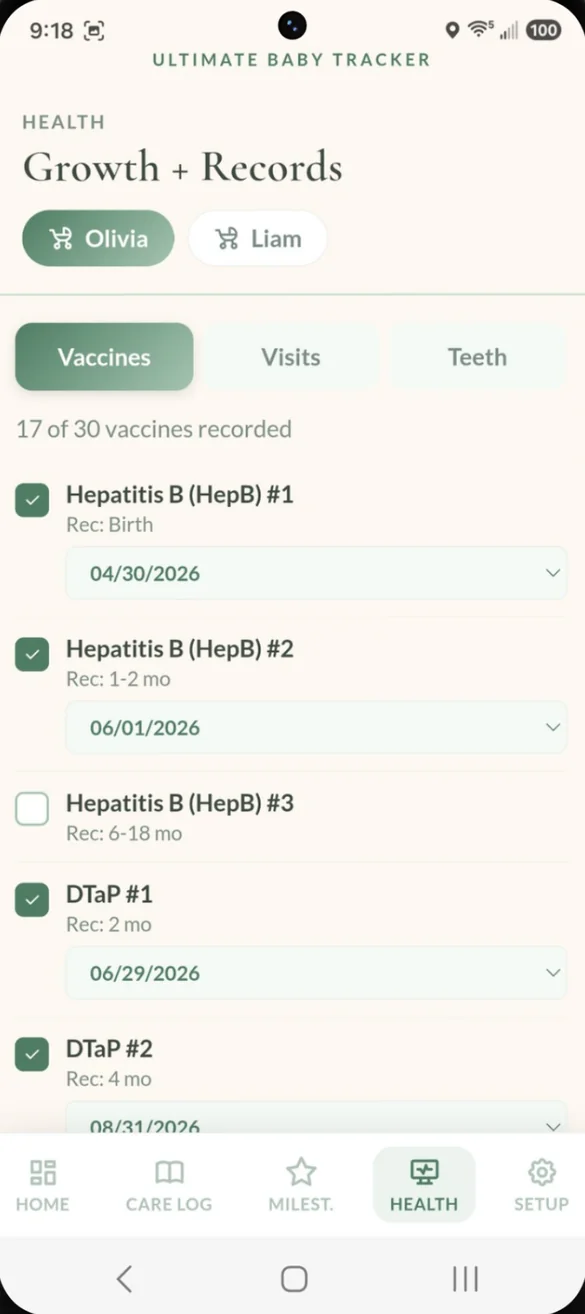
Know what's been given.
30 childhood vaccine doses are built in, each with its recommended age. Tap a dose to mark it given with the date, and see what is still outstanding.
- 30 doses: each with a recommended age
- Tap to record: with the date it was given
- Still to go: see how many are recorded and how many are left
Every checkup, its own record.
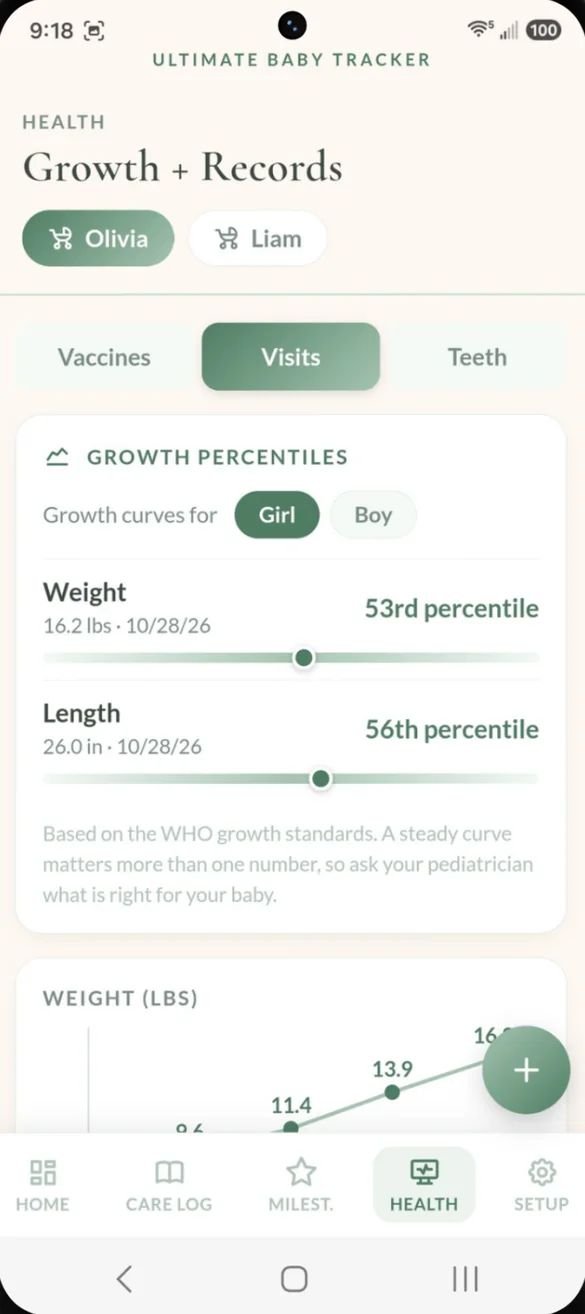
Log each checkup with weight, length and head size. Growth charts draw themselves, and percentiles are worked out from the WHO growth standards. The reason for each visit is saved with the numbers.
- Percentiles: for weight and length, from the WHO growth standards
- Growth charts: that draw themselves as you add visits
- Questions for the doctor: jot them down, check them off, and they print on the Baby Report
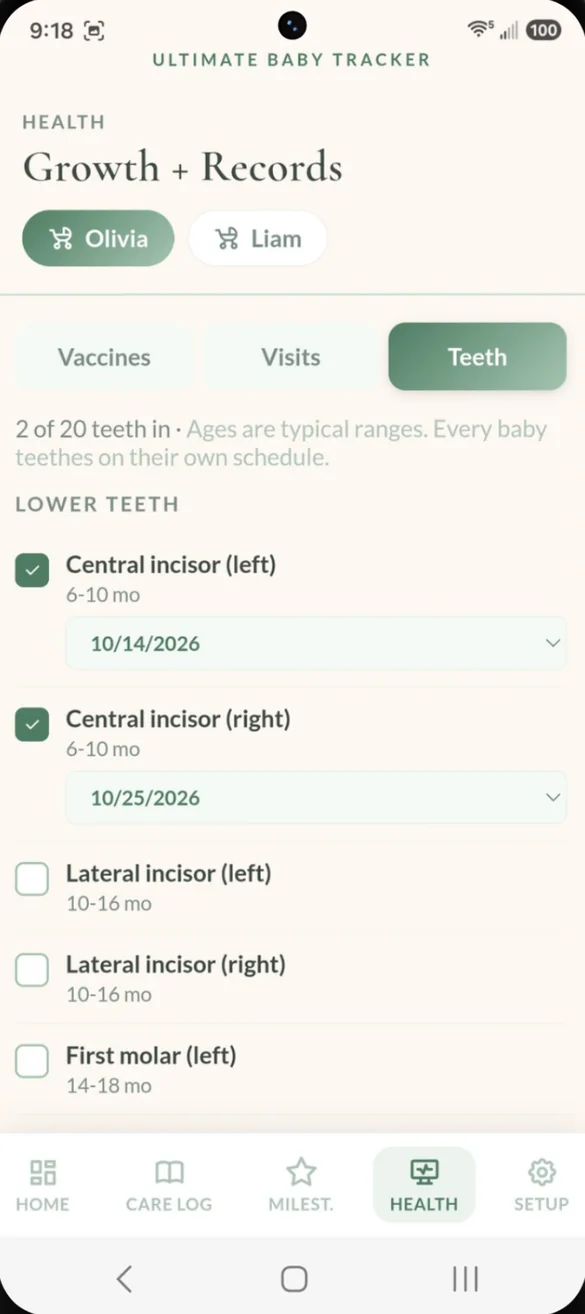
Every tooth, with the date.
All 20 baby teeth are listed with the typical age each one comes in. Tap a tooth when it appears and the date is saved.
- All 20 teeth: upper and lower
- Typical age range: for every tooth
- Tap to date it: the day it comes in
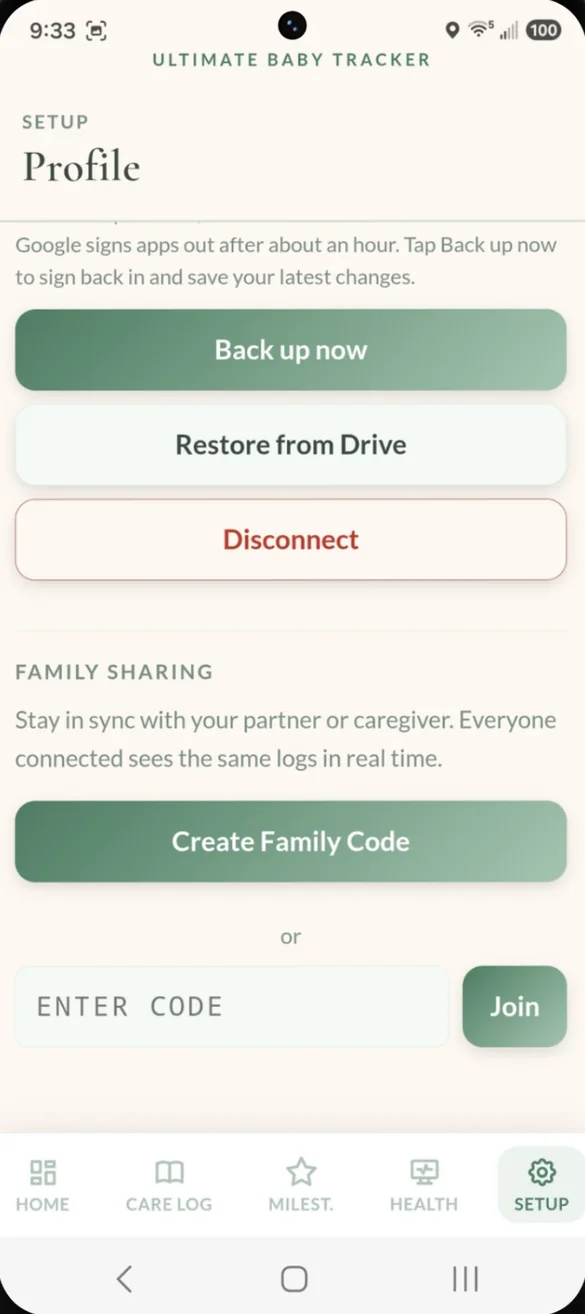
One log for everyone who helps.
Share a family code with a partner, grandparent or sitter, and everyone sees the same log on their own phone. No extra accounts, just a code to join.
- Family code: create one, or enter one to join
- Same log everywhere: feeds logged on one phone show on the others
- Running timers: family phones see a timer that is going
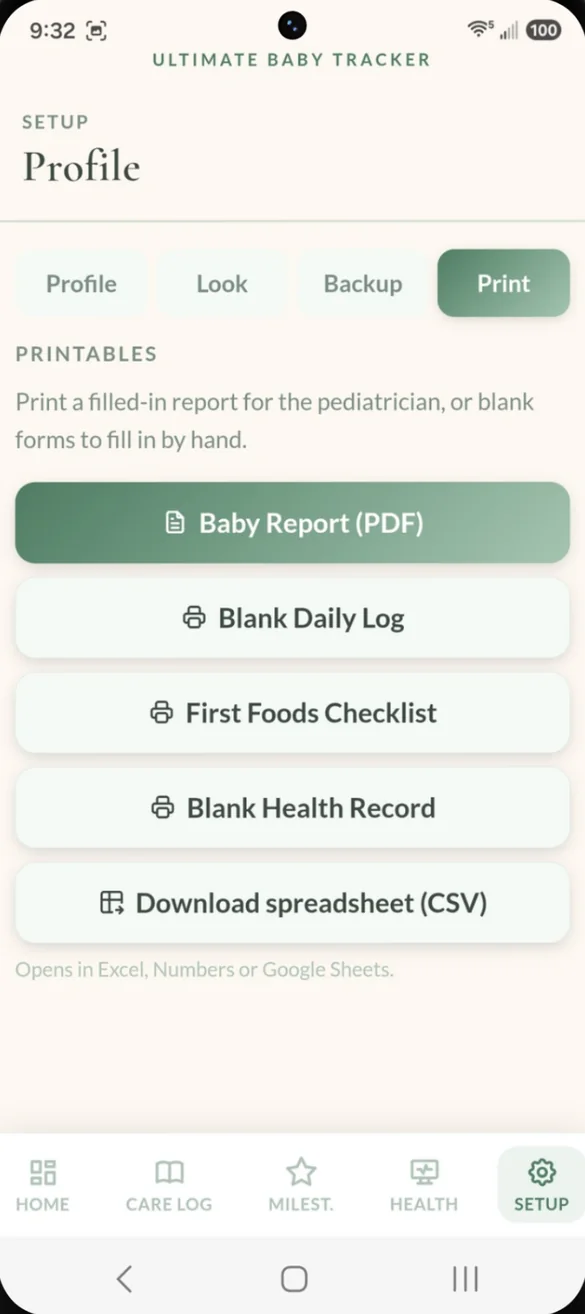
Paper for the pediatrician.
Print a Baby Report with the last 7 days of feeds, diapers and sleep, plus growth percentiles, visits, vaccines, milestones, allergens and your questions. Everything is made right on your phone.
- Baby Report: a filled in PDF to bring to checkups
- Blank pages: a Daily Log for the sitter, a First Foods Checklist and a Health Record
- Spreadsheet: download a file that opens in Excel, Numbers or Google Sheets
English or Spanish, whenever you need it.
Switch the whole app between English and Spanish with one tap. The printable PDFs translate too, so a Spanish speaking grandparent or sitter can use it just as easily.
- One tap: switches the entire app
- Printables too: the PDFs follow your language
- Switch anytime: back and forth as often as you like
Little extras that help
Sleep tracking
Naps and overnight sleep tracked separately, with a daily total, the typical range for your baby's age and how long they've been awake.
Medicine and temperature
See when the next dose is OK, based on the gap you set. Log temperatures in °F or °C.
Twins and siblings
Add more than one baby and switch between them with one tap on any screen.
Night mode
A dim, warm screen for middle of the night feeds. Hold the color button to turn it on.
8 themes and 6 fonts
Tap the color button to cycle through themes, and pick a font in Setup.
Phone and computer
On a computer it opens a full dashboard with a sidebar, today's totals and the full day's log.
Your baby's data stays yours.
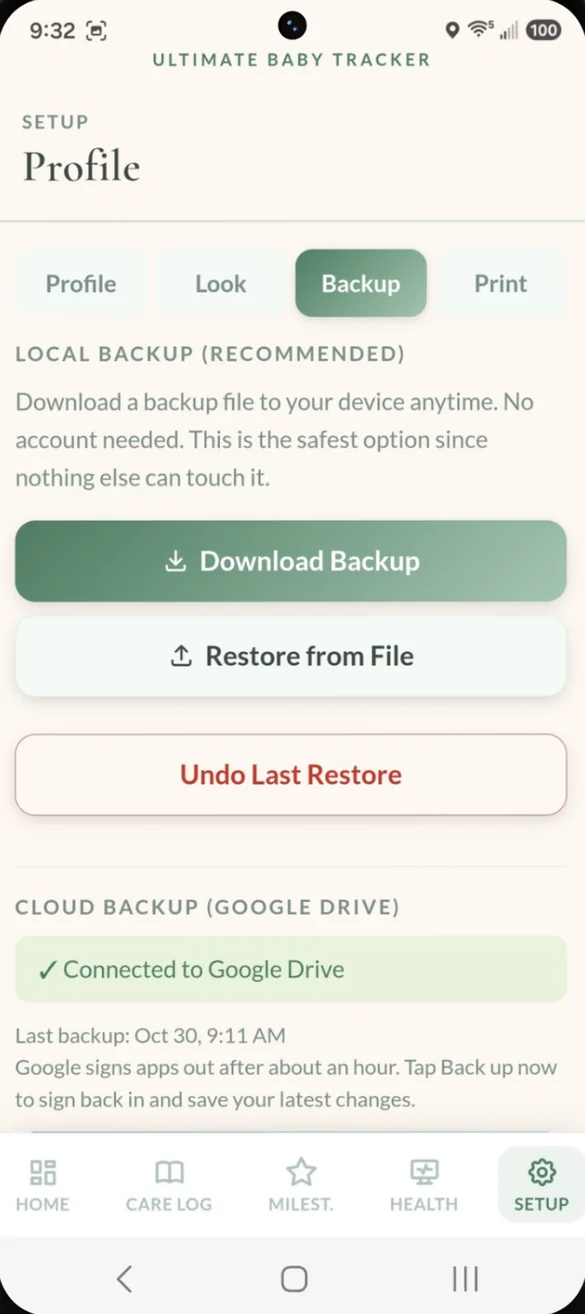
Everything saves privately on your device and works offline. Backups go where you choose: a file you download, or your own Google Drive, which keeps a rolling week of daily snapshots. Family sharing is optional. When you turn it on, your logs sync to the phones that join your family code. Sharing and Drive backup need an internet connection.
- One time purchase, yours forever
- Saved privately on your device
- Works offline, even with no signal
- Optional Google Drive backup in your own account
- Backup file with undo after a restore
- Optional family sharing with a family code
- No account, no login, no ads
How it works
Buy on Etsy
Download your PDFs, including the bonus printables in English and Spanish.
Tap the link
Open the link in the PDF on your phone, tablet or computer.
Add it to your home screen
Or bookmark it, then add your baby. Install guide
Good to know: this is a web app you save to your home screen, not an App Store download. It's for logging by hand, so it doesn't send reminders or push notifications, and it doesn't connect to baby monitors or smart devices.
It's a record keeper, not medical advice. Always follow your pediatrician's guidance on feeding, medicine doses and vaccines. Want something simpler? See the other trackers in the shop.
Questions
Is there a subscription?
No. You pay once on Etsy and the app is yours. No monthly fees and no ads.
Can my partner and I both use it?
Yes. Create a family code and enter it on the other phone. Everyone who joins sees the same log on their own phone, even a timer that's running. Family sharing needs an internet connection.
Does it send reminders?
No. Home shows when the next feed is due and the app shows when the next medicine dose is OK, but it doesn't send push notifications. That keeps it simple and private.
Can I track twins or siblings?
Yes. Add more than one baby. Each one gets their own care log, milestones, health records and timers, and you switch between them with one tap.
Is it available in Spanish?
Yes. Switch between English and Spanish with one tap. The app and the printable PDFs both translate, and the bonus printables come in Spanish too.
Where is my data saved?
On your own device. If you turn on Google Drive backup, a copy goes to your own Drive. If you turn on family sharing, your logs sync to the phones that join your family code.
Can I try it before I buy?
Yes. The free demo uses sample data and doesn't save anything, so try every button.
What if it doesn't work on my phone?
Send a message through Etsy and I'll help you get it working. If it doesn't install or work on your phone, you can get a refund within 30 days.
Try it before you buy
Tap around the real app in your browser. No sign up needed.