Bill Due Date Calendar Never Miss a Due Date Again
Missed due dates mean late fees and needless stress. Keep every bill in one place, sorted so the most urgent one is always at the top, and see exactly where each stands: due soon, due today or overdue.
- One time purchase
- No account or login
- No ads
- Phone, tablet and computer
What's inside
Every bill, its due date and every payment, all in one app.
Every bill, in one place.
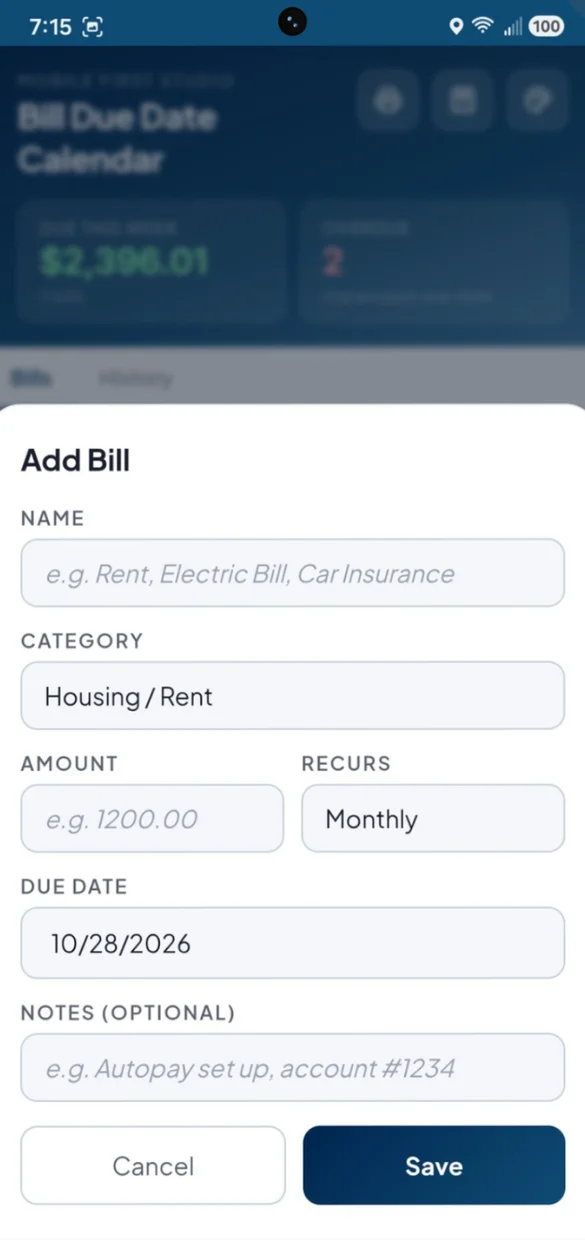
Add each bill once with its amount, category, due date and how often it repeats.
- Repeats: weekly, monthly, quarterly, yearly or one time
- 8 categories: Housing, Utilities, Insurance, Loans, Subscriptions, Credit Cards, Medical and Other
- Notes: like "autopay set up" or an account number reminder
One tap and it is handled.
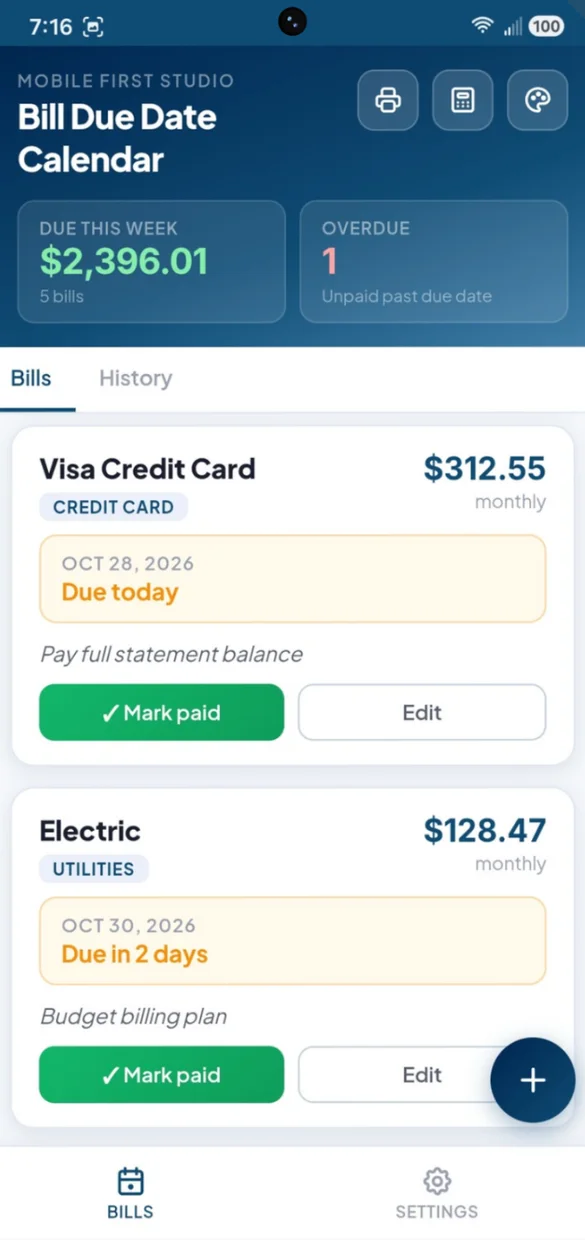
Mark a bill paid and the app takes care of the rest.
- Recurring bills: roll forward to their next due date
- One time bills: stay visible, marked paid
- Made a mistake?: undo the payment in one tap
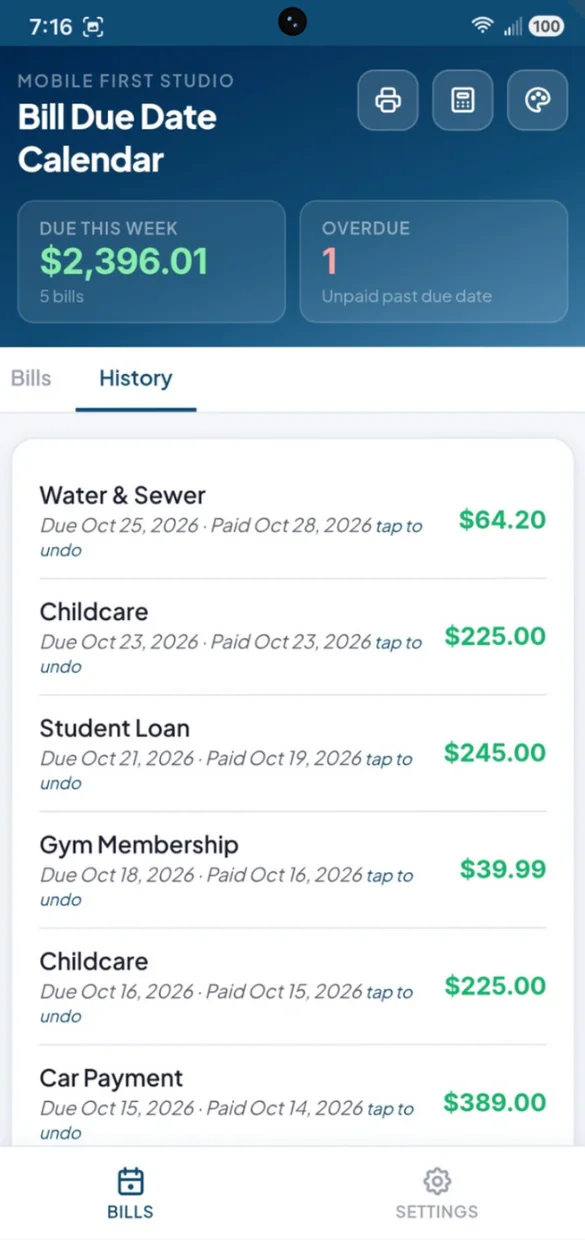
Every payment, logged for you.
Look back any time to confirm what you paid, and when.
- Due and paid dates: on every payment
- Tap to undo: right from its history entry
- A running record: of your bill paying over time
On paper or in a spreadsheet.
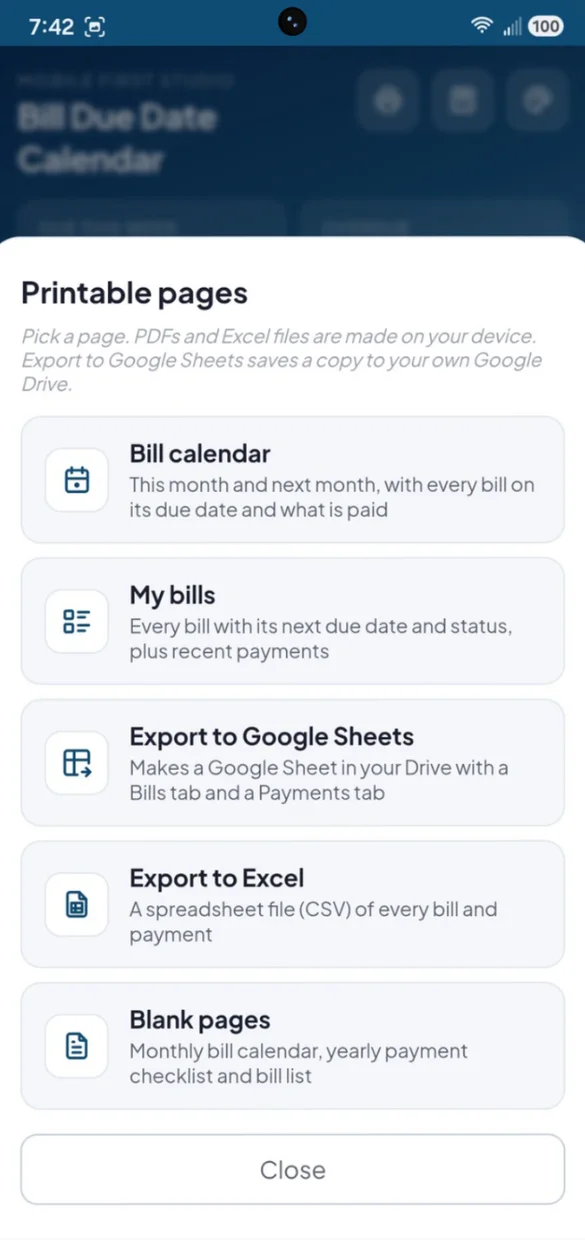
Print your bill calendar or your bill list. PDFs and spreadsheet files are made right on your device.
- Bill calendar: this month and next, every due date filled in
- Blank pages: a monthly calendar, a yearly checklist and a bill list
- Excel and Google Sheets: every bill and payment
Little extras that help
Due This Week
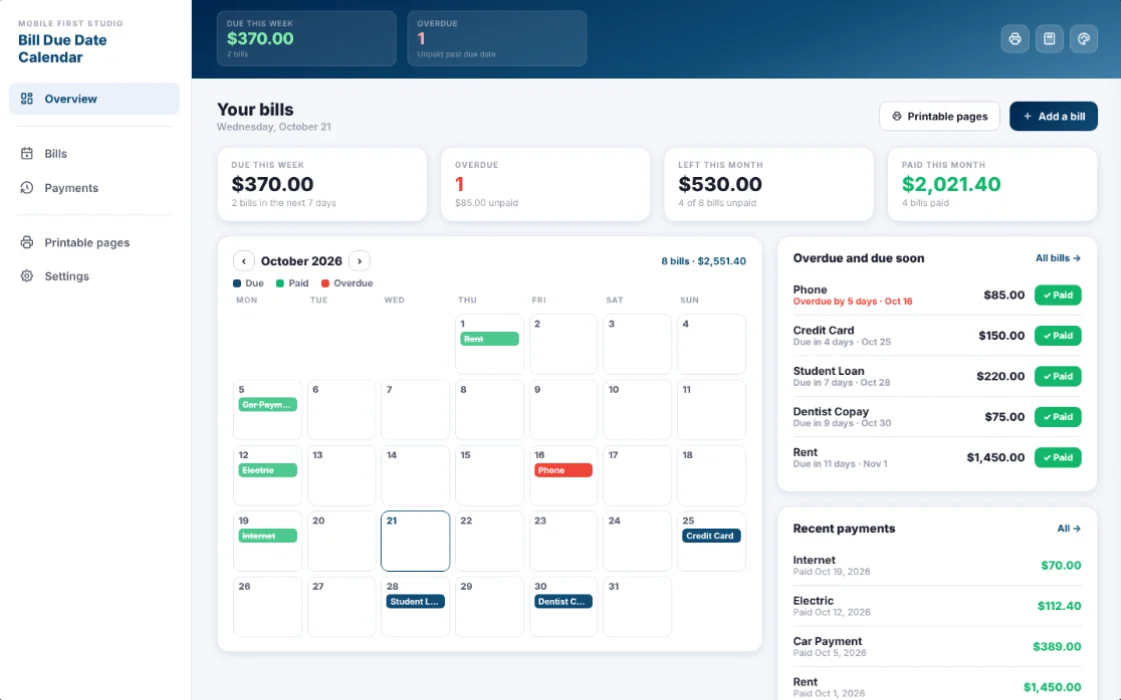
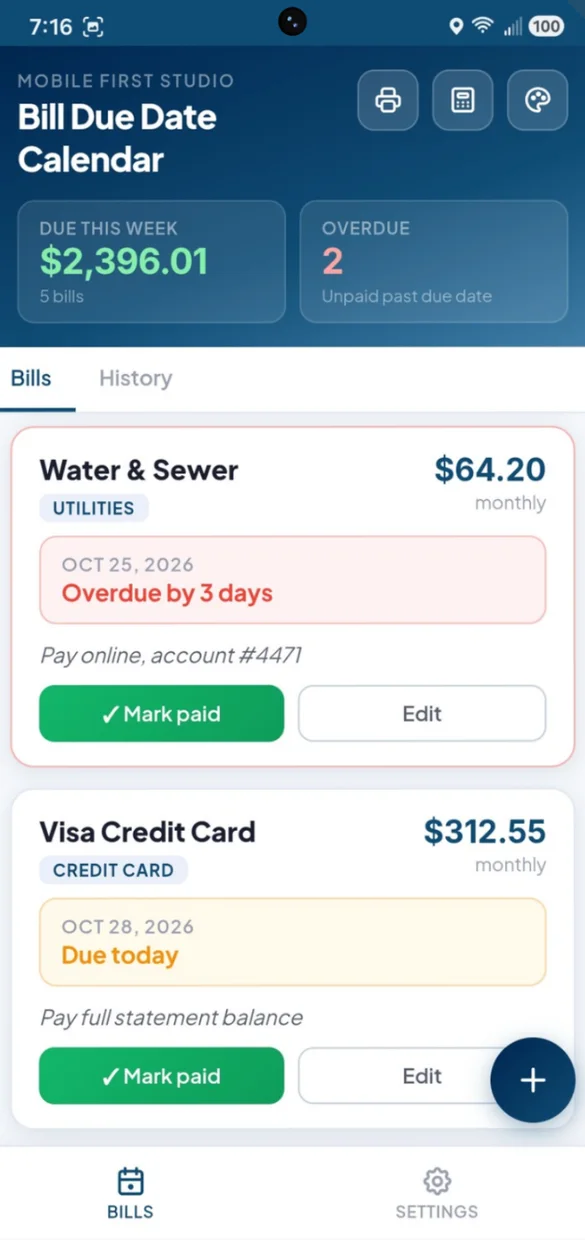
What is due this week and how many bills are overdue, always at the top.
Clear status
Due in a few days, due today, due tomorrow or overdue by how many days.
Built-in calculator
Split a shared bill or check a total before you pay.
6 themes and dark mode
Navy, Forest, Violet, Rose, Slate and Amber. Tap to change colors, long press for dark mode.
Start fresh
Rename the app, or clear everything from Settings and begin again.
Works offline
Check your bills and mark them paid with no Wi-Fi.
Your bills stay yours.
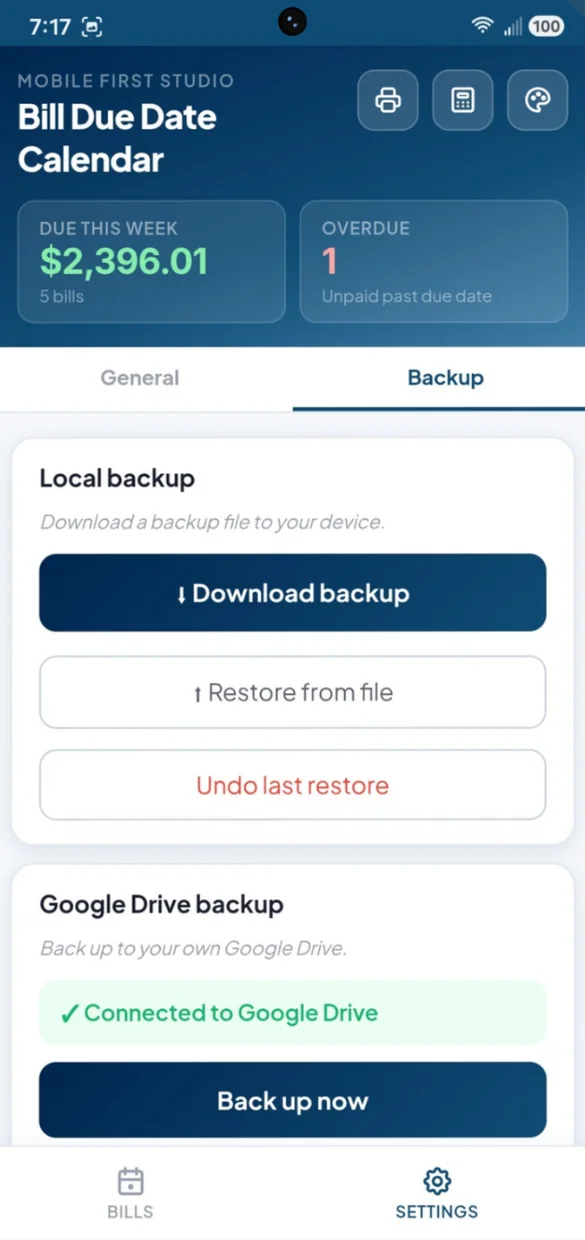
Everything saves privately on your device and works offline, with no account or login. Connect your own Google Drive, or download a backup file and keep it yourself. One tap undoes a restore.
- One time purchase, yours forever
- Saved privately on your device, offline
- Optional Google Drive backup, in your own account
- Backup file you can download anytime
- Undo a restore with one tap
- No account or login, ever
- No ads, ever
How it works
Buy on Etsy
Download your app PDF and your bonus printable pages.
Tap the link
Open it on your phone, tablet or computer.
Add it to your home screen
Or bookmark it, then add your first bill. Install guide
Good to know: this app tracks bills and due dates only. It does not send reminders or push notifications, connect to your bank or set up autopay, so check in every so often. It does not track income, expenses or debt payoff.
Want the bigger picture? Ultimate Finance Hub adds full accounts, income and pending expenses.
Questions
Is there a subscription?
No. You pay once on Etsy and the app is yours. No monthly fees and no ads.
How does the bill calendar work?
On a computer you see the whole month with every bill on its due date: blue when it is due, green when it is paid and red when it is overdue. Flip ahead to next month to see what is coming. You can also print this month and next as a calendar.
What happens when I mark a bill paid?
One tap marks it paid. Recurring bills roll forward to their next due date, so you never re-enter them. Every payment is saved to your history, and you can undo one if you tap it by mistake.
What if I miss a bill?
An unpaid bill never quietly moves on to next month. It stays at the top of your list marked overdue, with how many days late it is, until you mark it paid.
How often can a bill repeat?
Weekly, monthly, quarterly, yearly or one time. Pick a category too: Housing, Utilities, Insurance, Loans, Subscriptions, Credit Cards, Medical or Other.
Will it remind me or pay my bills?
No. It does not send reminders or push notifications, connect to your bank or set up autopay, so check in every so often. Due This Week and Overdue at the top of the app show where you stand the moment you open it.
I want to track subscriptions too. Is there an app for that?
Yes. Subscription Tracker shows your real monthly and yearly subscription total and catches price increases. For accounts, income and bills together, see Ultimate Finance Hub.
What if it doesn't work on my phone?
Send a message through Etsy and I'll help you get it working. If it doesn't install or work on your phone, you can get a refund within 30 days.
Try it before you buy
The real app with sample data. Nothing you type is saved.